AI suddenly passed the “more time saved than spent” point around December 2025. A little late, I’ve finally started using agentic AI in various places over the last 2-3 months, and wanted to jot down my thoughts on what works, what doesn’t (yet?), and what the future might look like. If you are curious about AI for programming, or have been skeptical in the past, if “AI slop” is the first thing that comes to mind, this post will show you some ways that AI can be really helpful. Certain tasks have been completely transformed. Notice, I said “some”, not “all”! But it is a lot.

Generated with AI on my M5 Pro with Qwen Image 2512 in ComfyUI. This is a very different type of AI compared to an LLM! But I thought it was fitting.
Intro
There’s a ton of hype around AI. I get it. It’s frustrating; we’ve been hearing “it’ll replace all (insert anything here) in just a few months!” for years now. And we’ve been seeing a lot of annoying and frankly awful uses of AI. AI is great at summarizing, but it can also do the reverse, and make a lot of text with a little input - I’m sure you’ve seen that. You’ve probably seen PRs generated with AI, commonly called “AI slop”, which are lazy and terrible. (By the way, humans absolutely can make slop PRs too, I remember waves of them every October, apparently people would get “swag” based on PRs submitted or accepted or something.)
“AI won’t replace you. A person using AI will.”
- Unknown
But in November/December 2025, something did change. Agentic AI suddenly became mainstream and models got good enough to actually do real software engineering work. Claude Code started it, though now there are a lot of good tools. These are not automated PRs replacing programmers, these are tools used by programmers. Like an editor. (In fact, it’s the most successful attempt yet at getting me out of vim, more so than VSCode). They all handle pretty similarly, with common commands.
What AI is good at
I’d like to go over some places where I think AI is an amazing tool. I want to point out a key theme, though; AI is good at things humans aren’t (or, more specifically, don’t like to spend the time to do). That creates a “honeymoon” period, where you have a bunch of things you didn’t want to do that you can suddenly do with an AI. I think once those “easy” tasks are done, it will be interesting to see how AI continues to fit in.
I’ve had AI make a list of the 107 PRs I’ve made in the last three months with AI assistance (26% of my 412 PRs) and I’ve tried to illustrate most points with some examples from that list. I also used AI to help me with setting up the model badges (green for NRP.ai OSS models, blue for Copilot, Auto is Copilot’s auto model selection).
Review
Probably the first place where I found AI useful was in text review. You can paste anything (non-confidential!) into ChatGPT and ask it for a review. You can even tell it to take on a role. It can even look up references for you - it found that I had cited a PEP but my notation didn’t match the notation in the PEP I cited, for example. I use it for any longer text I write now.
This is a great place to use local AI, as well, if you want to review something private. You can ask Agentic AI to review PRs, as well.
I’m sure you’ve seen the “copilot reviewer” on GitHub. It started out about 1/3 useful, 1/3 not useful, 1/3 wrong. I’d say it’s now about 80% useful and 10% genius. Just a few examples:
- pypa/packaging#1170: It read my binary pickle strings and noticed they didn’t match the comment description above them.
- pypa/packaging#1171: It also noticed I added a spell ignore for “ba”, correctly deduced it was due to the binary string, and suggested workarounds.
It does still miss context a bit, and I generally don’t like or use the suggested replacements it produces that often, but it’s crazy how fast these tools evolve. I think it’s still running on something like GPT 5.2 for cost reasons, so it will get even better.
Human review is still better, but humans don’t always have the time, and the two can complement each other, as well. There’s very little to lose by having it run on pretty much any PR.
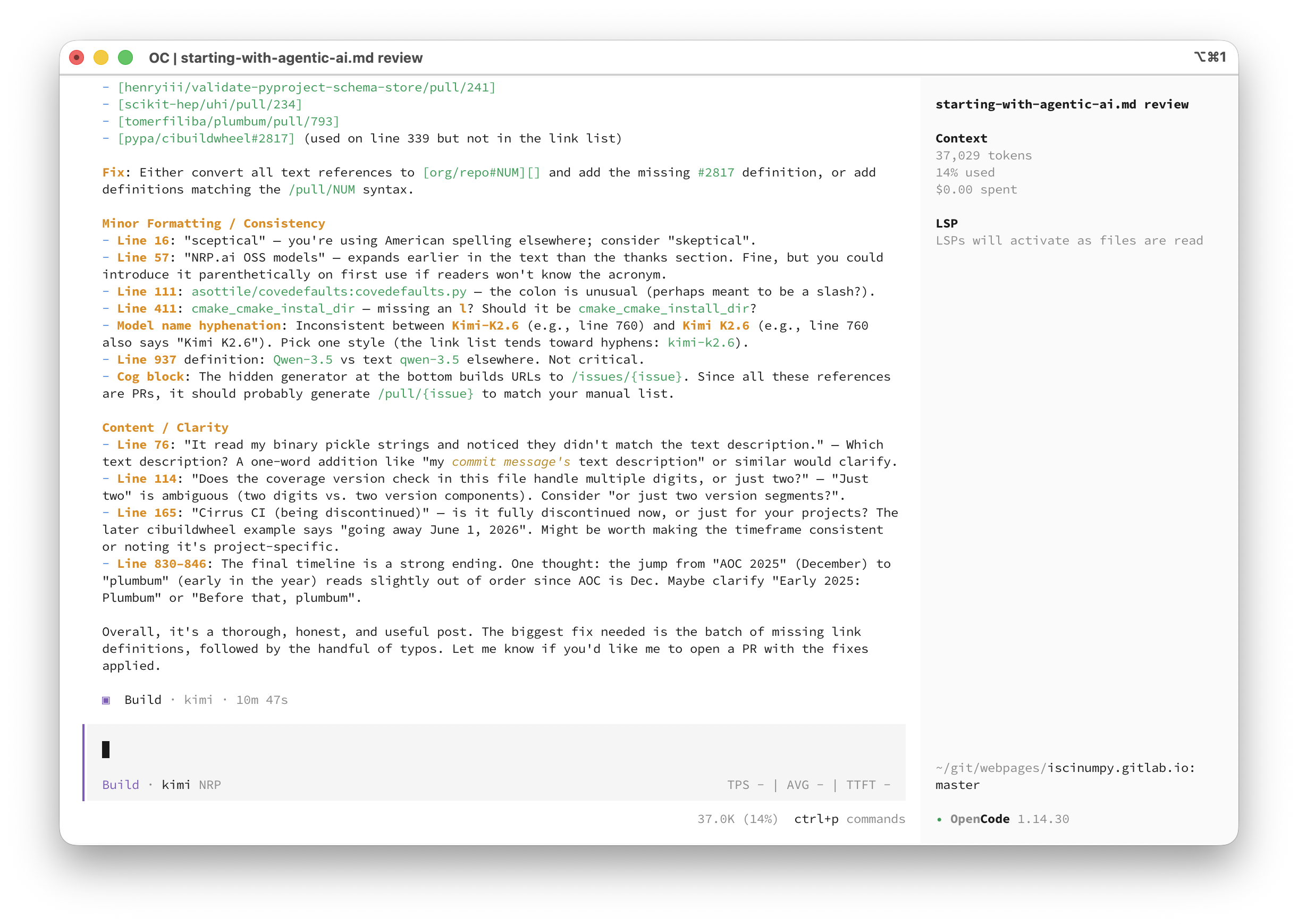
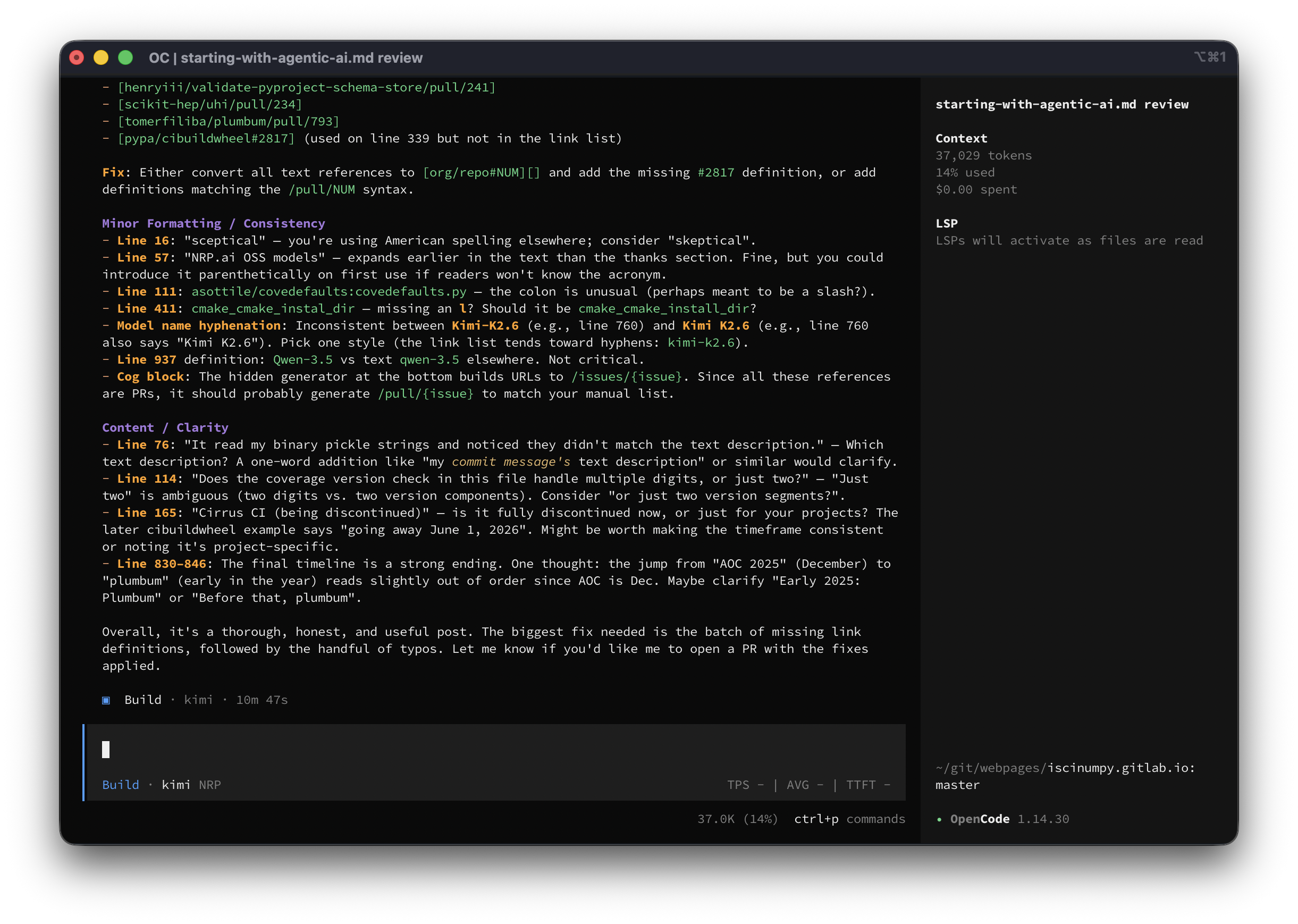
Here’s what the review of this post looked like in OpenCode:
Inspection
One of the first things you should try is asking questions about a codebase. You can ask where something is defined in CPython, for example, and it will work through and find it, even if it’s in C. You can ask if it’s possible for some return value to be None, and it will work through the logic and show you why it can or can’t be None. This is a great place to use GitHub’s built-in “chat with agent” button on the top when in a repo.
Be sure to try this in a harness that supports showing the thinking, as it’s
interesting - it’s basically looking over the codebase the way you would, using
git grep (or some alternative), then reading parts of files, then searching
again, etc.
Since I don’t mark a PR with AI assistance if I just inspected the codebase with AI (and it might not be related to a PR at all), I don’t have a list of links here, but some examples of prompts:
pypa/virtualenv: Where is the interpreter discovery cache located?tox-dev/python-discovery: Does this shortcut the python search when given something likepython3.11? It could just find an executable with that name, instead of running the interpreter to see what version it is.asottile/covedefaults:covedefaults.py: Does the coverage version check in this file handle multiple digits, or just two? I want to know if<3.10.2is valid, for example.
I also often use it to look over failing logs, compare the contents of two zip files that should be the same, etc.
Here are some examples of easy edits I made that utilized the ability of AI to quickly look over the codebase and figure out where and what to edit. These are mostly faster because I could go do something else while they worked:
- pypa/build#1033: Add towncrier default categories
- scientific-python/cookie#770: Use the new repo-review
- scikit-hep/boost-histogram#1105: Move pre-commit to prek
Contributing to an unfamiliar codebase
Closely related, if you have a codebase you don’t contribute to much, AI can
quickly figure out what they are doing, and help make sure you don’t forget
anything. It can help you get the tests running, run the linters and formatters,
and more. Remember to run /init if they don’t provide an AGENTS.md or
similar file!
Remember to ensure the PR is high quality with human PR description before you
open it. Mentioning you used AI in the description is considerate. If there’s an
AI_POLICY.md, respect that.
Don’t open a PR that a maintainer could easily do themselves unless asked! Don’t
make your AI a co-author, it’s Assisted-by, it cannot hold copyright.
A few quick examples of PRs to things I don’t contribute to as much:
- cpburnz/python-pathspec#110: Nicer debug print outs (and
__str__for regex pattern) - OpenNTI/sphinxcontrib-programoutput#74: Support ansi via
erbsland-sphinx-ansi - pypa/pip#13917: Use dependency groups from packaging 26.1 with better errors
Conversion
AI is great at converting between things. That’s why it’s good at translation, but it’s also good at any other conversion too. Want to convert a citation into bibtex? Need to move from a defunct CI provider to a new one? Need to take the model file from one AI harness and put it into another? (OpenCode to Pi, in my case) Need a machine readable file from tables on a webpage? Write something in Python and want a Rust version? Need to convert a MkDocs site to Sphinx, due to the fragmentation and collapse of MkDocs?
Remember to give the AI a link to the schema or a description of the format for best results.
Examples:
- abravalheri/validate-pyproject#302: Converting from Cirrus CI (being discontinued) to GitHub Actions
- pypa/build#1033: Conversion of
tox.initotox.toml
Merge conflicts
AI is really, really good at simple but repetitive tasks. You don’t need the
latest model. Solving merge conflicts simply doesn’t need to be done by hand
anymore. You just launch your harness and type rebase this PR. Like most AI
tasks, it might take a while, so do something else while it works. There’s also
a way to trigger it directly in GitHub now (which is basically just a @copilot
command), but I think that’s only for traditional merges (yuck), not rebases,
due to worries about force pushing (history is not destroyed by rebases or force
pushing, you still have reflogs, etc., but okay).
Assuming you’ve set up with an AGENTS.md file, it will probably even test and fix the final result, too.
I’ve used this on dozens of PRs, but since it doesn’t modify the PR, I don’t have a tag for them.
- tomerfiliba/plumbum#786: Partial revert
Fixing tests
Another repetitive task is fixing failing tests. AI is great at debugging (also see next section). It can rerun tests, add debug statements, trace things down, and come up with a solution. It even happily reads long CI logs. It might not come up with the ideal solution - always look it over, but once you know what is wrong and have a proposed fix, that last bit of iteration is the easy part.
Often this will be part of another PR, fixing tests that fail after the first CI run, so I don’t have many examples here; other PR examples might have this too.
- tomerfiliba/plumbum#763: Fixing tests on update PR
- tomerfiliba/plumbum#786: Fix local builds and some links
- scikit-build/scikit-build-core#1283: Clean up incomplete or old editable in wheelhouse
- scikit-build/scikit-build-core#1288: Fix Windows
PermissionErrorfrom concurrent wheelhouse lock races - scikit-hep/uhi#232: Fix installed PoI and add bh 1.7.2 tests
- scientific-python/repo-review#351: Fix release GitHub Actions
Bug fixes
AI is great at turning really good issues into PRs, and at working through failing tests (see last section). It’s also really good at taking examples and turning them into tests and fitting them in in a proper place and style into your test suite. I’ve fixed bugs that were over two years old in several of my repos using AI; I just never had the time or desire to sit down and work through a painfully long process. Now it’s easy when I can get a proposed fix and analysis of the problem as a starting point. It also has a really wide knowledge of a lot of weird behaviors and issues. It can hallucinate too, but the “agentic” part means it tests theories and rejects things that don’t fix the problem.
Here are a few bugfix PRs, often made by pointing AI at the issue or failing
logs (excluding some @copilot ones, as those don’t show up as made by me in my
search):
- abravalheri/validate-pyproject#303: Allow duplicated identical schemas
- abravalheri/validate-pyproject#306: Support relative urls in SchemaStore
- abravalheri/validate-pyproject#310: Ensure utf-8 encoding
- boostorg/histogram#421: Support sparse storage with accumulators
- boostorg/histogram#423: Avoid dangling-reference in sample tuple conversion for C++23 compatibility
- henryiii/validate-pyproject-schema-store#237: Only automerge for bot commits
- henryiii/validate-pyproject-schema-store#241: Support relative urls
- scikit-hep/uhi#234: Allow stacked values
- pypa/build#1040: Ignore installed when running pip
- pypa/build#1049 Keep environment from leaking in Python 3.15
- pypa/build#1056: API should not ignore installed, only CLI
- pypa/packaging#1152: Do not reload the tags module in tests
- wntrblm/nox#1072: Write out
.gitignore/CACHEDIR.TAGto our dir - scikit-build/scikit-build-core#1246: Use
as_posixfor prefix matching - scikit-build/scikit-build-core#1293: Protect setuptools
SetupErrorfor setuptools plugin
Writing tests
Be careful, as tests it writes are not always correct, but it’s still a good way to add tests. Ask AI to improve your coverage - if you can produce a coverage report, it can iterate over the missing lines and write tests to cover them. You need a bit stronger of a model here, as weak models might just write out meaningless unit tests; you want the model to understand what is needed.
Examples (often part of another PR, but there are a few that were made just to add coverage):
- tomerfiliba/plumbum#789: Increasing coverage
- scikit-build/scikit-build-core#1289: Increasing coverage
- scientific-python/repo-review#368: Adding webapp tests
- scientific-python/cookie#766: Fill out some missing tests
- pypa/packaging#1174: Add a pickle test
Fixing lints
Have a lint that doesn’t have an autofix? AI can do it, it is happy to iterate on a list of recommendations and apply them. It’s never been easier to activate new lints.
And the more linting rules you have, the better AI gets overall at working on your code, so it’s a win-win.
Example (mostly part of other PRs, but a few for enabling new lints):
- pypa/build#1028: Adding ruff SIM/RET
Better docs
I don’t like AI generated text. But I also don’t like writing docs. And AI is great at converting code into readable text that pairs with the code. I’ve even seen a project move all docs writing to AI so they’d get completely consistent style and exact mathematical formulas for every model in the code.
I’ve been able to use it to match styles, move text around, and fill in missing details. I also used it to explain a confusing bit of code (that I wrote some time ago) so I can edit it in the future with less hunting around to figure out what it does.
Examples:
- pypa/packaging#1103: Move
utilitiesdocs inline, like other modules - pypa/packaging#1104: Move
markersdocs inline, like other modules - pypa/packaging#1159: Add section for
errorsand fix missing details - scikit-build/scikit-build-core#1276: Improve docs on confusing source module
Repeating work
Sometimes you do something, but you need to do it more times. Like when I made histogram objects generic; I implemented one of the generic methods by hand, then had AI take my example and apply it to the other affected methods (turned out there were only two more, but it still was helpful). Or in packaging, where someone contributed a custom pickle for Version, then I applied the same idea to the other core classes with AI.
Examples:
- pypa/packaging#1168: Apply
Versionpickle-safe PR toSpecifier/SpecifierSet - pypa/packaging#1170: Apply
Versionpickle-safe PR toTags - pypa/packaging#1171: Apply
Versionpickle-safe PR toRequirementsandMarkers
Repetitive tasks
Things like dropping old language versions are perfect for AI. Combined with good linters, like Ruff using the UP code, working with CI, it can do a very good job finding everything that needs to be updated.
There’s an open standard SKILL.md that lets you write out a human and AI
readable set of instructions that users can then apply to a repository. You can
either type /skills and pick the skill, or the AI can auto-match on the
description and use the skill if needed. I’ve made several of these, like a
‘drop python 3.9’ skill that drops a python version from all the different
places it shows up, and looks for common improvements like pattern matching.
I’ve got another one that adds a minimum version checking job, and yet another
that applies the scientific python development guide’s repo-review to a
repository. I’ve seen one that teaches an AI how to look up particle masses.
Examples (mostly without SKILL usage):
- scikit-hep/particle#754: Drop Python 3.9 and start using pattern matching (used SKILL)
- scikit-hep/histoprint#154: Drop Python 3.8
- wntrblm/nox#1049: Drop Python 3.9
- pypa/build#1036: Drop Python 3.9
- pypa/packaging#1157: Drop Python 3.8
- pypa/pipx#1786: Drop Python 3.9
- scikit-build/scikit-build-core#1281: Drop Python 3.8
- henryiii/check-sdist#156: Minimum version test job to noxfile
- pypa/cibuildwheel#2817: Drop Cirrus CI (going away June 1, 2026)
Adding static types
A special case of a repetitive task is adding static types. It’s slow, and
non-AI tools to do it don’t do a very good job. It’s also something you don’t
need the best model for, at least for the first 80%. Weaker models do love the
Any type, so you can take a stronger model and ask it to look for and work out
Any types after the weaker model is done. Typing the test suite is an example
of something I only did a few times before AI, but now it’s much easier. I also
used it to convert JavaScript to TypeScript, which I’m not as strong in as
Python typing.
Examples:
- tomerfiliba/plumbum#739: Finish typing (see older PRs too)
- pypa/cibuildwheel#2794: Type the test suite
- pypa/build#1020: Fully annotate test suite
- pypa/build#1023: Improve test annotations
- scientific-python/repo-review#333: Move from JavaScript to TypeScript
- scientific-python/repo-review#347: Add more TypeScript types
Tasks you don’t have time for
Looking through my list of PRs, I realize quite a few of them are things I would not have had time for otherwise; small cleanups or minor features and fixes that I could fire off an agent on and forgot for a bit. Swapping click for argparse, restructuring files, etc.
Here are a few examples:
- scientific-python/repo-review#310: Remove click
- scientific-python/repo-review#331: Break up the webapp
- scientific-python/repo-review#353: Rename webapp
- scikit-build/scikit-build#1173: Remove usage of py.path
- scikit-build/scikit-build#1175: Convert decorator into fixture
- tomerfiliba/plumbum#793: Fill out
__all__and__dir__for modules
Big refactors / new features
You can write out a plan for a change, then AI can implement it. It might not be perfect, but you can test drive it (it will very likely work and pass tests!), and evaluate if it’s worth doing or even polishing off and using the AI generated one.
I’ve done this several times, testing out compiled versions to see if it was fast enough to be worth adding, testing the performance of various ideas, and more.
This is true for new features; AI might not produce the code you want to make in the actual PR, but you can try out the feature, write tests for it, and make sure you like it before rewriting it yourself.
You want a good model for this, to ensure you get a good final result, and have the highest chance of getting usable code. The biggest time sink is working though the changes afterwards and understand it, so this can easily overwhelm you with code to review.
If you are implementing something with a published specification (could be an issue, or a PEP, etc), just point it at the spec, provide any extra details, let it make a plan (in plan mode), then let it go! I like to add the plan as a comment in the issue or PR.
Examples (focusing on ones with the AI contribution being the proposed one, which tend to be a bit smaller):
- scikit-build/scikit-build-core#1297: PEP 829
- scikit-build/scikit-build-core#1269: PEP 803
- scikit-build/scikit-build-core#1284: Experimental variant support (PEP 817)
- scikit-build/scikit-build-core#1285: Setuptools plugin
cmake_process_manifest_hooksupport - scikit-build/scikit-build-core#1286: Setuptools plugin
cmake_cmake_install_dirsupport - scikit-build/scikit-build-core#1287: Setuptools plugin
cmake_with_sdist=Falsesupport - scikit-build/scikit-build-core#1278: Setuptools plugin editable support (inplace)
- scikit-build/scikit-build-core#1282: Hatchling plugin editable support
- pypa/cibuildwheel#2827: Config settings placeholders
- pypa/dependency-groups#37: Resolve all
- pypa/packaging#1146: Marker
&and| - scientific-python/repo-review#324: Make WebApp a proper JS package (something I’d have struggled to do on my own for a bit!)
- scientific-python/repo-review#339: Add
--show’s functionality to the WebApp - scientific-python/cookie#764: Add a check for trusted publishing
- tomerfiliba/plumbum#774: Add support for color string processing
- tomerfiliba/plumbum#779: Add more
PathAPI based ondir(Path)
Some smaller feature examples:
- boostorg/histogram#422: Support passing a coverage parameter to project
- henryiii/check-sdist#145: Common generated files
Profiling
You can actually ask a model to profile something, and it will write a script to do the profile on the spot. You can then ask it to find ways to make it faster, or ask it to try specific ideas, and see how the profile changes. It can even check out older versions of the library and measure those if you tell it to!
If you want something lasting, you can have it help you write a suite, but I find the one-off testing to be the thing unique to AI (I know how to write an ASV suite if I need one, I wrote one for packaging before AI).
Writing config for the AI
If you need an AGENTS.md, AI is a good way to start. /init in most harnesses
(I like OpenCode for this) will write some sort of file like this; if it picks a
different name, you can rename it. You can also add suggestions, like
/init prioritize `uv run` for simple tasks, include architecture design, for
example. This is also how you update it. I’m still torn on whether this is
something every user should do before starting, or if a repo should ship
AGENTS.md.
This is also a great way to set up your OpenCode config, for example (copilot seems to avoid having a config, at least so far). You really don’t need a UI for settings with this.
Examples:
- scikit-build/scikit-build-core#1259: Add agents & copilot setup
- scikit-build/scikit-build-core#1270: Updated agents
- scikit-build/scikit-build-core#1280: Skip git worktree & better architecture
One-off scripts
While ChatGPT and other systems have been good at this for a while, agentic
tools are also great at writing scripts that are not going to do much or not be
commented. Making plots, analyzing data in a file, collecting your PRs (like I
did for this post), etc are all easy tasks for an AI. You can follow up with
questions on manipulating the data or ask it to write out directions. It’s also
great for taking your history in an interactive Docker session and turning it
into a Dockerfile; it even is happy to write a docker-compose.yml for you.
Quick profiling scripts (as mentioned above), all sorts of things are now just
something you can ask for.
The point of this is to do things you don’t need to commit, so don’t really have PR examples.
Writing or adjusting webpages
You can write or adjust webpages easily. Also it’s great for JavaScript or TypeScript; if you are a bit rusty, or just not really familiar with it but familiar with another language, you can get pretty far.
Examples:
- https://scikit-build.org
- Quite a few edits to repo-review’s webapp.
Triaging issues
An automated system is too easy to hack, but asking your agentic AI to go over the open issues and give you a list of issues that are easiest to close along with reasons why is really helpful. Similarly, you could ask for the best issues to work on first.
Concerns
In December the general view of AI was negative; in fact, I was contributing to a blog post from the Scientific Python community on AI, and my main contribution was to scale back a lot of the severe negative tone it originally had. But that article got delayed past the holidays, and by the time it came out, the general perception had already started a major shift. Now, there are just a few holdouts, but most people are quite positive now, with AI assistance used in nearly every major piece of software, like Linux, CPython, etc.
By the way, I still like the term “clanker” and will continue to use it, even if I like AI. It’s from Star Wars, why would I not like it? (specifically, Republic Commando, an excellent game, followed by heavy usage in the Clone Wars).
Legal
The prevailing opinion seems to be (I’m not a lawyer): Don’t let your tool list
itself as Signed-off-by (that’s for humans) or list itself as copyright
holder. Also avoid Co-authored-by. Use Assisted-by: tool:model (Linux
kernel’s suggestion) if you want. The original “Always credit the tool used if
it’s AI” has been replaced by “don’t try to give a tool copyright, it’s your
code, and you are responsible”. Some projects are starting to prefer that you
not list the tool you use, as it’s free advertising, and it makes it seem like
that tool could make a claim on the code, when it’s yours. You don’t list the
editor or formatter you use, why AI-based tools? (Also, addressing a common
misconception, LLMs are completely deterministic; randomness is added via
“temperature” and “sampling”).
Security
Security can also be a problem. It’s easiest to run Agents locally, but you have to trust the harness’s protection layer, which is usually manual approve vs. auto-approve. Copilot makes you approve almost everything, with opt-in exceptions, OpenCode only asks for things it thinks might be dangerous, and Pi doesn’t ask for much (any?). Running inside a container would be much safer, and there are other mechanisms, like bubblewrap.
Some possible things that could go wrong:
- Someone could embed comments into a webpage with instructions to your AI (this happened with automatic AI issue triage systems by making malicious issue titles!).
- AI tools are moving fast, and downloaded a lot, with lots of dependencies. Many of the recent attacks on PyPI have centered around packages that AI tools use. (This has nothing to do with AI, it’s just a popularity + high usage making a target.) Pinning your AI tool dependencies might not be a bad idea if you know how.
- Non-local AI sends a lot of stuff through the API, if you have non-open repos, you might need to trust your provider a lot.
- Be especially careful with authentication tokens and such.
Also, it has been known to do things like delete databases; don’t let it have access to anything it can destroy!
Review time
AI can write code faster than you can read it. This means the bottleneck is now reviewing code, rather than writing it. For some of the tasks above, like one-off scripts or testing out feature ideas, that doesn’t matter, you can just use the output if it’s correct, and not worry about clean code. But many of these do require good, reviewed code. You can use one AI to generate and another to review - The Copilot reviewer actually works really well on AI generated PRs, and there’s also an experimental mode in Copilot called rubber duck that pits two AIs (so double the cost) against each other - and this has shown to actually nearly be as effective as a higher model family (opus/pro) (which can come in at up to 15x cost these days).
Have we hit the point where code quality doesn’t matter? I think it still does: simpler code is also easier for the AI. But AIs are getting good at writing simpler code, and they are good at refactoring code, so I don’t really know what the future holds for code quality. Maybe the people digging themselves into a code dump will be able to use AI to dig themselves out of it in a few years. Months, actually. I don’t know. I do think tools like Ruff and a good type checker cause AIs to produce better code. For now, I’m going to hold that human review time is the most valuable resource (feel free to use AI to reduce human review time, though, and get the little stuff dealt with!).
What AI is not good at
AI doesn’t know best practices unless you tell it. It won’t use uv run by
default, it might just try to pip install --user directly onto your machine!
It won’t know to use the latest standards unless you tell it. New stuff (past
the training date, or just rare in the training) needs to be in the context for
it to use it (but it can!)
It struggles to know what is best. It can propose a fix, but it might not be the best fix (though overall understanding is improving!)
And I really don’t like using it to communicate - that is, the PR description should not be written by AI. I know, it can produce this awesome looking summary. But it has way too many words! And I don’t want to read a machine written summary in a PR body, I want to hear what you wanted. I’d rather see your prompt than any AI output, if you really can’t write anything else!
I personally hand write the PR description, and add
:robot: Assisted-by: Harness:Model at the bottom if I used AI to help with the
PR (early PRs might not follow this structure exactly). If I really need to put
something AI generated, like a summary, I’ll put it into a detail tag, or very
clearly mark it as AI. I have started letting AI draft the commit messages,
though, since I rarely spend time to make a nice one.
Never, never let a reviewer talk directly to an AI unless it’s clear to them
they are talking to an AI (like with @copilot). You should not waste a
maintainer’s time, and this is clearly one way to do it (there are others).
Also, make sure you are good at git. The exact command details don’t matter, but you should know how to rebase, safely force push, rewrite history, all that. Harnesses tend to avoid proper git manipulation in worries that you’ll do something destructive (rewriting history is not actually destructive, you can use the reflog to go back). You need to be able to tell the AI what to do, or do it for it.
If you love doing something, then do it - you aren’t being forced to use AI. Use AI for the boring stuff. The annoying stuff. The stuff on your backlog.
Tips
Here are some assorted tips.
If you are getting started:
- Use a good model (Kimi-K2.6+, Sonnet 4.6+, GPT 5.4+). You want your first attempts to succeed. Later you can learn to use more economical models, once you start getting close to your limit.
- Always start with
/init. You don’t need to commit the file, but just having it helps the AI understand the broader picture without filling the context window. Rename it toAGENTS.mdif your harness sticks it elsewhere. - Use your preferences in that file. You can add text, like
/init use `uv run` everywhere, or just edit the file by hand. Or with the AI. - Use the AI when setting up the AI! Need a model file? Ask the AI to read the
page and make one for your harness. Tell it to edit
AGENTS.md. Etc. - Don’t try to one-shot it. Yes, I know what the AI companies tell you. Ignore it, talk with your LLM as it’s working, tell it what to do better, iterate. Watching the thinking process (like in OpenCode) is informative.
- If using GitHub Pro, try mentioning
@github, or asking the agent to do something. Using a codespace is a good way to manage security. - If you want to focus on a file or two, attach it as context, with
@filenamein TUI’s, or click the+in IDE’s. - Feel free to refer to stuff! Say things like
"Fix the failing CI on this PR"or"Let's work on issue #123". The tool should know how to look stuff up, check diffs, etc. Want to implement something with a design document? Just link to it. (Be a little careful with security, remember that LLMs see comments and will follow instructions in comments.)
Once you get a bit further on:
- Try a TUI harness (GitHub CLI, OpenCode, etc) if you started on an IDE.
- Try using plan mode before starting to discuss larger changes. The AI should be able to notice weak points in your plan and ask you for clarification. You might get closer to one-shotting things. But it’s okay to iterate!
- If you can judge a task as being easy for the model you are using, try a
cheaper/faster model (
gpt-*-mini,minimax-2.7, maybe a local Qwen/Gemma). - All of these tools also have
/...commands, see if any of those are useful.
Later:
- Try writing
SKILL.mdfiles for things you do a lot. Of course, you can use the AI to help write them. - Have a few things going on in parallel. Ideally on different repos, but you
can do it on one repo with
git worktree. I think Claude Code is famous for having good worktree support. I have enough projects so I don’t need this. - Try Pi, adding some plugins. It’s very light-weight and customizable. You might need to add things to make it look up PRs and such, though.
Concepts
Anyone that thinks AI doesn’t require skill or learning hasn’t tried to use it. Or they listened to the AI companies hype campaigns. :) Here’s a quick glossary of some of the things you can learn:
- LLM: The brains.
- Tokens: LLMs don’t process letters, they process groups of letters called tokens. This is one reason they have so much trouble with the number of “r"s in “strawberry”! The model probably got two tokens, “straw” and “berry”.
- Context window: How much a LLM can think about. Unlike brains, LLMs
don’t evolve as they get new information; everything is in the context. You
have the model (fixed) + context window, that’s all. 256K is fine, no one
needs 1M. As it gets full, stuff further away has less effect on the output,
so keeping it low is good. Use
/compactto replace the context window with a summarized version; harnesses usually do this at 95% automatically. - Cache miss: Usually the context window just grows, so the old part is kept. Switching models or summarizing will redo the window, causing a cache miss.
- Training cutoff date: The last point the model knows about. Usually a few months before release. Anything newer must be in the context.
- Local LLM: these only affect you if you are running locally.
- Open weight: You can download the model and run it (if you have the right hardware).
- Open source model: Generally means the model training files and definitions are also openly available.
- Quantization (Quant): How many bits are used for the model weights. 16-bit floats are native for most models, but you can find 8-bit and 4-bit versions for faster/smaller runs, at the loss of some accuracy, especially for longer windows.
- Model size: A state-of-the-art model is around 1T (1 trillion) parameters (Kimi K2.6). Next-gen models like Claude Mythos are 5T. Local models are usually around 27-31B. What you can run depends on your memory; model size times 2 is approximately how much memory you need for 16-bit (native). Approx 1:1 for 8-bit, and 1:2 for 4-bit.
- MoE (Mixture of Experts): Not every parameter is active, so this gives an idea of how much it knows (vs total parameters, which is more how much it could know). Dense models have fully active parameters, smarter but slower.
- Harness: The thing that makes the LLM agentic. Examples include Claude
Code, GitHub CLI, OpenCode, Pi, Codex, and many open weight models have one.
It is composed of:
- System prompt: A bunch of initial tokens that tell the LLM how to use the stuff below, and add safety measures. Around 10K tokens for OpenCode and Claude Code, under 1K tokens for Pi, and barely anything for mini-SWE-agent.
- Tools: Things the LLM can call to do work, like edit files.
- MCP: Model Context Protocol server. This lets a service make itself available to the agent. For example, the github MCP gives it the ability to interact with GitHub. Agents can use command line tools too, but this is designed for agents.
- Agents: Profiles/personalities for different tasks.
developeris generally the default one, most have aplannertoo. - Skills: These are extra instructions you can load, usually either by
direct mention (type
/skilland see what comes up), or by auto-matching the description with the prompt. The descriptions are loaded with the preamble. It’s an open standard, you can write your own, or install them (gh skillcan add them for you).
Models
Copilot models
Copilot offers three classes of models, 0x, 0.33x, and 1x models (Opus was removed from the pro tier, it’s a 7x model on pro+).
For 0x models, I’ve used gpt-5-mini, and it’s fine for very simple tasks. It’ll futz around quite a bit, but it can add types, follow specific commands (like SKILL.md’s), and such pretty well. Since there’s no direct cost, I’d recommend trying it once you are used to AI.
For the 0.33x models, Claude Haiku 4.5 is Copilot CLI’s favorite model in “auto” mode. It’s a pretty solid model, to be fair.
For the 1x models, Claude Sonnet 4.6 and GPT 5.4 are both good, with the Claude one being my favorite. VSCode’s auto mode picks these more, and gives a 10% discount (which the CLI doesn’t seem to do). You get 300 premium requests per month at the pro-level, so if you are starting out, use these until you start getting low on credits. Roughly 1 premium request’s worth of work is one significant prompt (or several little ones).
Local models
If you have around 32GB of memory and an M-series chip, or a good GPU, you can run local models.
Qwen 3.6 27B is supposed to be the best model at the moment. It’s pretty smart, though I find it struggles with tool calls, randomly messing up paths and characters, causing me to spend quite a bit of extra time just fixing its mistakes.
Gemma 4 is a bit slower, but I think it’s less prone to the messed up tool call issues.
Open weight models
Minimax-2.7 is a great balance of speed and intelligence. You’ll notice a lot of the use cases above don’t require a lot of understanding; for those, this is just fine, and very fast. Not quite a local model.
And the current king of open-source models is Kimi K2.6, which is fantastic. Slow, thinks a lot, but up there with Sonnet in intelligence. It’s more of a “do exactly what you are told” type of a model, and is smart enough to find the lazy way out sometimes, but it’s very, very good. The biggest problem with it is if you don’t really, really describe exactly what you want it to do, it can get stuck thinking for hour(s), going back and forth on what it thinks you want. Using planning mode helps, as does just being more specific.
Tools
VSCode / Copilot CLI
I started with VSCode, and it’s the one Microsoft obviously prioritizes. It’s a good way to work; it makes file edits but you still can approve/reject them afterwards. The 10% auto model discount is nice. However, one key feature of AI is that it takes time, so it’s really nice to do several things at once, which they have been trying to support, but I find IDE’s just don’t fit that model as well as opening multiple terminals does.
Copilot CLI is pretty good, with a lot of work trickling down from VSCode. It requires permissions for everything, and for some reason, you can’t set repository or system wide permission bypasses (in fact, it seems to avoid any config options - using a custom model requires environment variables). I like that it rings the terminal bell when it needs your attention, and it feels a bit safer than the others.
OpenCode
I like the /init implementation, and the sidebar is nice. But I wish it was a
bit more interactive (why can’t I click on a “files changed” item and see a
pop-up diff?). It’s also got a very long system prompt, making it slower
especially with local models.
Pi
This is a “vi” like experience, in that it’s a light-weight minimal tool with a pluggable architecture. I’d recommend looking at LazyPi, which has lots of nice plugins (even if you don’t use LazyPi, you can install the plugins, that’s all it does anyway). The system prompt is under 1K tokens, about a tenth of the others.
Toad
I love the powerful UI, but it’s behind in other areas, like you can’t even select a model. I wish all terminal apps were this powerful in visuals, though. It’s also hard to set up with a custom model, I’ve only tried the copilot integration and left when I found I couldn’t pick my model.
Others
The original and gold standard is Claude Code, and I know it’s supposed to be good. Since they leaked the source code a while back, there are also open forks of it like OpenClaude. I think hooking up other model providers takes a little effort, but everyone will tell you how to do it due to how popular it is. I expect the system prompt is pretty good. (I’ve not used it). I’ve heard the CLI is better than the desktop tool. Anthropic is the undisputed leader in coding, and as such they’ve done some fairly user unfriendly things recently. I like that they provided open source maintainers (including the CPython team) with 6 months of Max, I hope that continues (but I don’t think they are going to accept my request, either due to the program being full, or due to my EDU account, I think they want schools to pay. Even though I have multiple repos that pass the program requirements).
Codex is OpenAI’s tool, I feel it’s more open and friendly (you can even use it on the free plan), and I’ve heard the effort is in the desktop tool, not the CLI. They’ve been very generous with the compute credits, too. I’ve not used it.
I don’t know anything about Cursor.
Final words
I’d like to end with a few items in a timeline for my experience with AI assistance.
- AOC 2025: This was my first major usage of AI, for learning a language. This was before agentic AI, it was mostly me asking ChatGPT questions like “how do you write this Python snippet in TypeScript”.
- plumbum: I don’t have time for Plumbum, as it’s not part of my main work, so I decided I’d start using AI here early in 2026. I was able to solve some long-standing bugs, and do a few large projects like add static types, with AI doing about 80% of the work.
- flake8-lazy: I decided to write this a couple of days after lazy modules came out in a CPython 3.15 alpha. This had never been done before, so I knew it wasn’t in the training set. This is where I got shocked into realizing how good agentic AI had become. I wrote almost nothing by hand - though I iterated a lot, putting my knowledge of making flake8 extensions and parsing into it.
- Packaging: I’ve used it a bit in packaging. I was reluctant, assuming someone might object, but I clearly indicated when I used it and no one did. This was when I started really realizing the perception around AI had changed.
There still are pockets of AI resistance; a few vocal users stopped Blender from getting a yearly donation from Anthropic (no strings attached!). Even though about 1/3 of the donations Blender survives on come from companies that are involved in AI. I think the art community is still very wary of AI, even though AI art is not actually related to AI coding (in fact, art generation is not an LLM at all). The blender MCP plugin allows users to use an LLM to work on their (human) art more effectively, simplifying the access to coding. It’s really sad to see users (who are not donating) kill donations for something they don’t understand.
In fact, another quote I like:
The people who should be ensuring AI remains open and accessible are too busy denying it.
- Unknown
I’d like to thank NRP.ai for access to several models, and fantastic support; they had Kimi K2.6 up within a couple of hours of the announcement. Local models were run on an M5 Pro with 64 GB of RAM (if I were to have ordered my computer just three weeks later, I’d have gone for M5 Max + 128 GB!).
This is an exciting time! I think AI has clearly passed the bar to being an important tool in any programmer’s toolbox.
Since posting
I’ve found a few other places I’ve really liked AI:
- Working on this website and it’s theme - I’ve made about 100+ PRs to
BeautifulHugo
- It can handle the translations
- It can handle colors and theming, converting for dark mode, for example
- It made a two-phase bootstrap upgrade possible (I’ve tried and failed a few years ago by hand!)
- I could easily verify and fix issues
- I reworked the example site to provide documentation for the theme
- I could recover old PRs easily
- Sorting issues and giving suggestions on what to close and work on
(
gh issue closeis a quick way to close by hand based on the AI summaries!) - I’ve made an in-repo skill by telling it to study the changelog and write a skill that keeps it’s style for cibuildwheel
- Pointing at something and saying “make that for me” is great - see https://iscinumpy.dev/page/projects/
I’ve been using GLM-5.1, which isn’t quite as smart as Kimi, but it thinks 6-10x less, and actually asks me questions instead of saying “but wait” a hundred times.
I’ve also set up a skill that makes a branch, commits, makes a PR, then goes back to main, all in my exact style, and with this at the top of the AI generated text:
🤖 Human guided, AI assisted PR (using this skill). AI text below. 🤖